> **TL;DR:** I used REA to investigate Granola, then built a meeting notebook for myself. What helped, what broke, and what the experiment taught me.
I've had a back-pocket test for coding agents for a while now. Build me something like [Granola](https://www.granola.ai), make it fit how I work, and get it to the point where I'd choose to use it. I'm on a budget and trying to be more frugal. I'd like a good meeting notebook without another subscription.
Previous attempts haven't gone particularly well. I tried [Minutes](https://github.com/silverstein/minutes), then [Anarlog](https://github.com/fastrepl/anarlog). Open-source apps gave me a lot to work with, and adapting them to my workflow generally worked. But I'd eventually run into a limitation, or a decision baked into the product that didn't fit what I wanted. I kept coming back to the Granola experience.
Minutes repeatedly missed my microphone on Zoom calls. With Anarlog, I spent time getting local transcription, summaries, and speaker channels working with my setup. After enough of that, wanting a recording I could find and process again felt pretty reasonable. If the transcription goes wrong, at least let me keep the conversation.
Then I came across [REA, Reverse Engineer Anything](https://rea.tools/) ([GitHub](https://github.com/morluto/rea)). It gives an agent tools and instructions for investigating an application through the files installed on your machine. I asked the agent to try it against Granola on my Mac before building our own version. Could understanding the app I liked get this attempt closer to the one I wanted?
The setup was Codex with GPT-6 Astra on High, using REA 6.4.0. I didn't hit any refusals. Everything ran against the copy of Granola installed on my own Mac, for my personal use, and no Granola code went into ggranola.
We called the result ggranola. My sense is that REA helped with what I'd been missing in the earlier attempts. I knew the experience I wanted. I hadn't understood enough of what made it work.
## REA gave the agent something concrete to investigate
REA comes with an analysis tool and a skill, which is a set of instructions the coding agent reads. The skill guides the investigation: choose an analysis that fits the application, narrow the questions, and keep track of what the evidence supports. For us, the questions were about capturing audio and turning a meeting into a useful note.
It wasn't a particularly tidy first run. The broad scan hit an archive-checking error, and a later attempt ran into a sandbox restriction. The agent had also started that first scan five seconds before it read the skill. Apparently reading the instructions after starting isn't exclusively a human habit.
After consulting the instructions, the agent narrowed the analysis to three audio-related files. That produced useful findings, alongside unresolved questions. At one point, REA couldn't trace a reference that the agent could see in the source. We kept that contradiction in the record and used direct code reading and conventional tools to fill in parts of the picture.
The agent could break an unfamiliar application into questions it could investigate, keep partial answers, and continue. We came away with findings we could use and a record of where the investigation stopped.
Before this I'd never heard of [Ghidra](https://ghidra-sre.org/), a free tool from the NSA that turns compiled apps back into roughly readable code. A common question about REA is why not just tell your agent to run Ghidra. In my run, REA didn't use it at all. Granola is an Electron app, so its code is JavaScript rather than a native binary, and REA reads that directly. The skill is what kept the agent asking specific questions and writing down what it found, instead of wandering through the app's code.
## The notes had to remain mine
One finding helped explain the interaction I wanted to reproduce. Granola's packaged code kept the notes I typed separate from the transcript and the generated note. Its generation inputs brought those pieces together with meeting context.
That gave us a concrete behavior to build. I could type during a call, then ask the local model for a summary afterward. My writing would remain there. The generated text would be something I could use alongside it.
I think this is where the investigation mattered most. Asking for something Granola-like leaves a lot for an agent to guess. Once we understood that separation, we could implement it and check whether the app preserved my notes. REA helped structure the investigation; reading the code supplied the detail behind this particular finding.
Audio retention was a choice I wanted to make differently. The packaged code had an audio-saving path that defaulted to off, with cleanup after seven days. We didn't inspect my account's active flags, so I can't use that to describe what Granola was doing for my account. For our app, I wanted an explicit policy and files I could reach.
Those choices came from the investigation and from me. The menu bar was my request. A later look at Granola's live Settings informed more settings work.
## A working app gave me more useful complaints
I asked for a factory of subagents. The first implementation split gave workers responsibility for audio capture, local inference, and the interface. A coordinator handled integration and packaging. The first application commit landed about 91 minutes after the original session began. By the following morning, microphone selection and calendar permissions were getting attention. The time between those milestones includes pauses and overnight gaps.
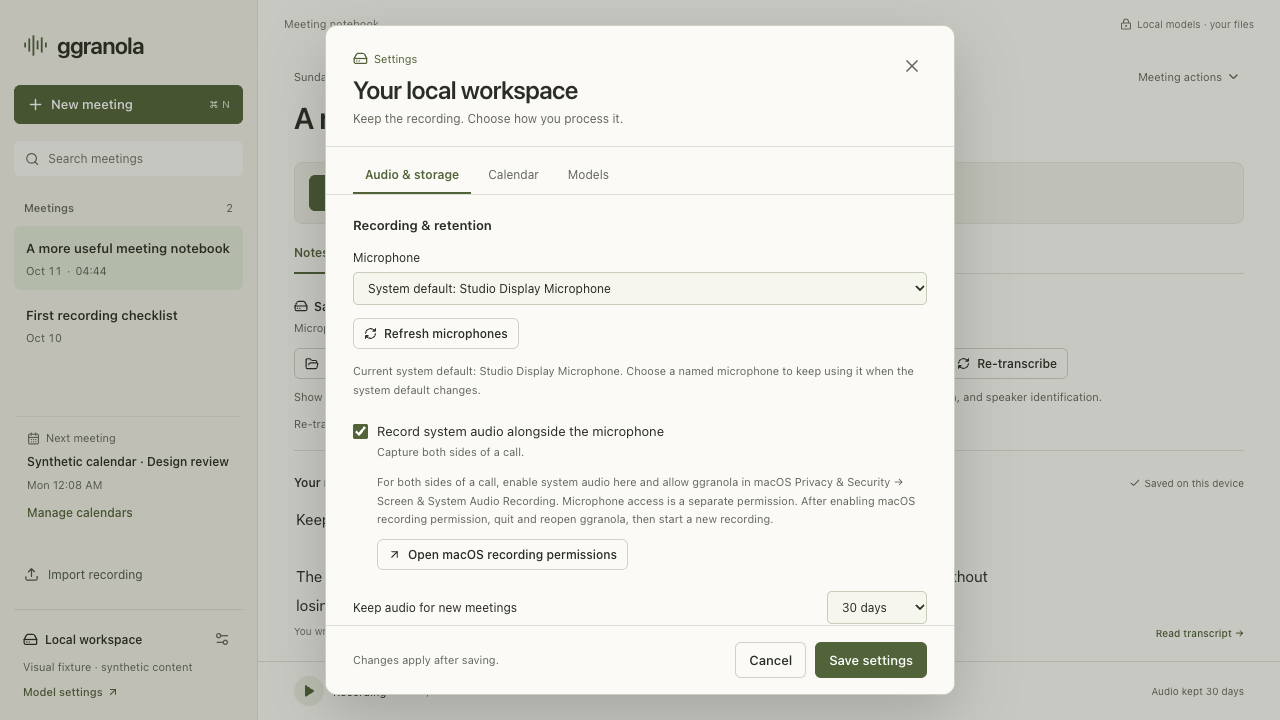
Once I could use the app, I could ask for specific changes. Put each meeting in its own folder. Let me name the speakers. Show me which microphone is being used, and let me choose it. Give me one recording I can open without taking away the original audio tracks.
ggranola's Settings, captured in a browser test fixture with sample meetings. Click to enlarge.
That's a much more useful result to me than a screenshot of a microphone dropdown.
Reviews caught things I wouldn't want to discover in a real meeting. Command-Q could bypass the recording guard. Our echo filter could confuse different names or signed numbers with duplicate speech. The agents fixed those failures and added checks for them. I've [written before about putting reviewers around coding agents](https://georgediab.com/posts/2026/for-every-agent-that-writes-code-two-agents-review-it), and this run supplied more reasons to keep doing it. These were separate sessions of the same model, so this wasn't a test of reviewers from different model families.
Then there were the things a code review couldn't finish for me. macOS stopped accepting earlier recording permissions after rebuilds changed the app's signing identity. We moved to a consistent development identity, I repaired the initial permissions, and we tested another update. It recorded without asking for approval again and preserved the existing meeting files.
Calendar access needed its own signing fix and a native consent dialog for me to click. A growing meeting list later pushed controls outside the window, which led to another layout fix. Building a personal app includes becoming its first source of bug reports.
That brought me back to [The Agents Are Idle](https://georgediab.com/posts/2026/the-agents-are-idle), where I wrote about work concentrating in decisions and oversight. Here I was choosing what the product should retain, trying builds, and handling OS consent. The agents did substantial work, and I kept having to decide whether the result was the thing I wanted.
## Then I had to point at the right widget
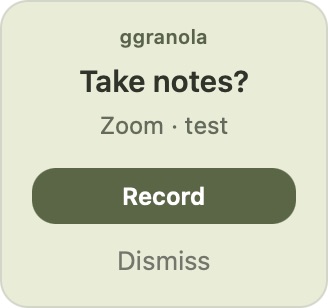
Later, I asked the agents to investigate Granola's floating reminder. Their first pass followed its separate top-right notification panel. I meant the smaller widget lower on the screen, closer to where I was looking. I sent a screenshot. The labels **Take notes**, **Start**, and **Not now** led the agent to a different part of the app.
Granola calls it a `nub` in its shipped code. I can't really improve on that.
Our ggranola reminder, shown at its intended size in a recording-free native UI test. The Zoom · test label is sample content. Click for a larger detail view.
A focused REA pass and direct inspection of verified package files then let us investigate its lower-right placement, dragging, and prompt lifecycle. My correction gave the agent the right thing to investigate. The installed files still couldn't tell us which server-controlled options were active for my account.
## I want to see whether this one stays in use
There's an awkward accounting question in spending all this effort to avoid another subscription. I can't yet call it a saving. It depends on how much I use the app and how much attention it needs afterward. Being frugal was part of the motivation; having a tool I could shape for myself was another.
I'm learning from this even before I know whether it saves me money. Working through the recording failures and the gap between a passing test and a usable app gives me something to take into the next experiment. A meeting notebook I want to keep using would be a pretty good bonus. If someone else finds it useful too, even better.
REA seemed to make this attempt more effective. I suspect understanding the app helped. Perhaps clearer requirements from the earlier attempts helped too. We didn't do a matched run without REA, so I can't put a number on its contribution. I can point to what we learned and how it informed the behavior we built.
Right now ggranola records both audio sources on my Mac, transcribes locally, and keeps the recordings and my notes. Calendar setup and the menu bar both work, and I haven't tried it on my Linux laptop yet. There's more to establish before I can say it works as well for me as Granola.
I haven't decided whether to open-source it yet. I'm making it for myself, with no plan to sell it. For now, I want to get through a week of ordinary meetings, find my notes and recording afterward, and choose to use it again for the next one. That's the back-pocket test I keep coming back to.